Use cases / video workflows

Luma Labs examples that move from idea to finished scene

The most useful luma labs examples are not isolated clips. They show how a rough brief becomes a reviewable sequence, a polished visual reference, or a finished piece of communication. This guide maps practical scenarios to repeatable workflows, with enough structure to help a team decide where generative video actually earns its place.

Explore the workspace

the scenario's pain

Product teams

Product teams often have a strong concept but no affordable way to visualize motion before a shoot. A short generated sequence can test camera direction, atmosphere, and interaction before production resources are committed.

See luma dream machine prompt examples for product concepts

Independent creators

Creators need more variations without turning every idea into a full edit. Luma labs examples help them explore transitions, establishing shots, and alternate moods while keeping the creative decision in human hands.

Find prompt patterns for fast creator experiments

Educators and trainers

Lessons can lose attention when an abstract process has no visual demonstration. A concise scene can make a system, historical moment, or imagined environment easier to discuss and remember.

Browse visual prompt ideas for teaching scenes

Marketing teams

Campaign teams may need several visual routes before choosing one. Generative video provides a quick way to compare tone, framing, and narrative rhythm without presenting an unfinished concept as final advertising.

Use structured prompts for campaign exploration

01 / workflow

3 concrete workflows

Start with a decision, not a tool. The strongest examples usually follow one of three paths: visualizing an idea, extending an existing asset, or creating a small sequence for review.

Visual brief
When a team is choosing between several creative directions, turn each route into a short motion study. This is best for mood, camera, pacing, and composition decisions.
Use it when the question is “what could this feel like?” rather than “can this ship unchanged?”
Asset extension
When a still image, product render, or location plate already exists, use it as the visual anchor for a controlled movement test.
This workflow is useful when continuity matters more than surprise and the team needs a bridge from design to motion.
Scene sequence
When a creator needs a short narrative, divide the idea into shots with one clear action per prompt. Generate, review, and select rather than asking for an entire story in one pass.
This keeps iteration legible and makes the final edit easier to plan.

02 / visual result

example output

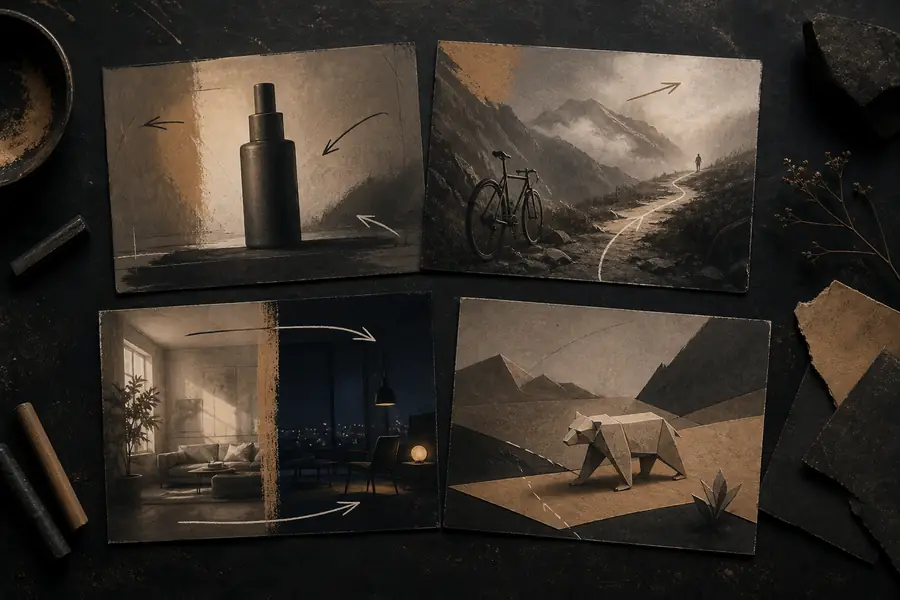
Initial visual workspace used to plan a generative video scene
Before — a loose visual direction with the subject, setting, and motion still undefined.
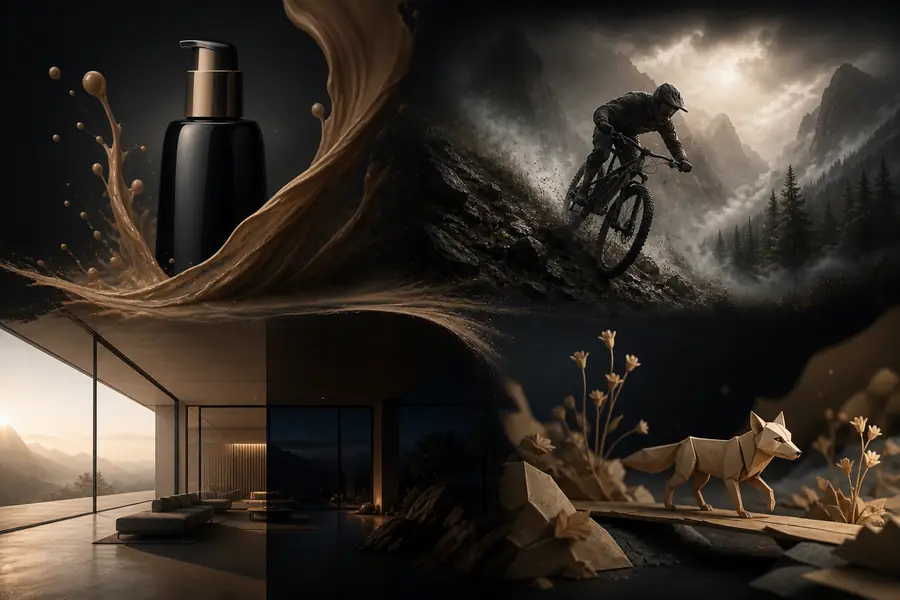
Developed cinematic scene showing a polished generative video direction
After — a concise scene direction ready for review, editing, or production planning.

The useful transformation is not simply sharper imagery. It is a clearer creative decision: who or what is moving, where the camera is placed, and what the viewer should notice first. This is why luma labs examples work best as evidence inside a workflow rather than as a gallery detached from the brief.

03 / working value

compliance notes

Treat generated footage as a production input with a review stage. Confirm the rights and provenance of any reference material, avoid implying that a generated person or event is documentary evidence, and label synthetic media when the audience could reasonably misunderstand it.

3review stages: concept, selection, final edit
1clear owner for prompts and source assets
50%less ambiguity when each shot has one action
0assumptions about rights without verification

Keep a small record of the prompt, reference inputs, date, and human edits for important work. This is especially useful for campaigns, classroom materials, and client approvals. A polished clip can still need a provenance note, accessibility review, and a check that logos, likenesses, and third-party materials are being used appropriately.
04 / continue exploring

scenario FAQ

These questions come up when teams move from browsing examples to planning a real test.

What makes a useful example?

A useful example explains the starting brief, the intended motion, and the decision the output helped someone make. A visually impressive clip without that context is harder to reuse.

Can examples become final video?

Sometimes, but they are often more valuable as concept studies, inserts, transitions, or references for a larger production. Review continuity, artifacts, sound, rights, and audience expectations before publishing.

How should a team compare outputs?

Hold the subject and objective steady while changing one variable at a time, such as lens language, lighting, camera movement, or pace. That makes the comparison informative rather than subjective noise.

05 / format history

the scenario FAQ

Generative video examples have become more useful as the surrounding workflow has matured. The shift is from novelty clips toward reviewable, directed visual work.

  1. Short motion studies

    Early teams used text-to-video primarily to test atmosphere, subject movement, and cinematic possibilities before committing to a conventional shoot.

  2. Reference-led iteration

    Creators began combining written direction with visual references, making outputs more consistent across a concept review and easier to compare.

  3. Workflow integration

    Generated clips moved closer to storyboards, pitch decks, animatics, and editing timelines instead of living only as standalone demonstrations.

  4. Human-directed production

    The strongest practice treats the model as an exploration layer: people define the brief, select the useful result, refine it, and approve the context in which it appears.

06 / plan a test

scenario FAQ

Estimate the review load before you begin. More variations can create more choice, but a focused batch is usually easier to assess and explain.

9directions to review · about 45 minutes for a focused comparison

Use the result as a planning estimate, not a promise. Give each direction a defined purpose, keep the strongest two or three, and record why they survived. That small discipline turns a collection of luma labs examples into a useful creative system.